Date |
|
Feedback |
|
Status |
| 9 Jul 2026 |
|
Love SuperBadders, and it is working great in our club making club night run a lot smoother and better.
I just wondered if you had thought about adding a tournament setting that can use the strengths for people who want to attend, and make it fair for all.
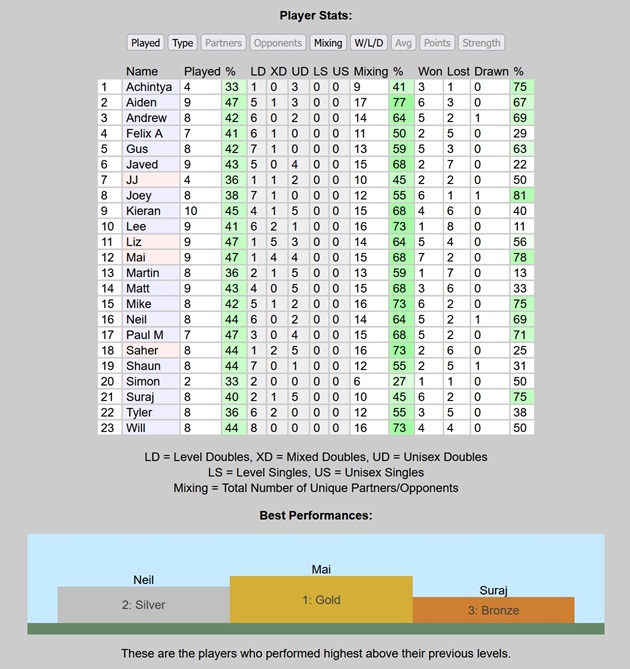
Answer: Thanks very much for this suggestion. There are lots of different types of tournaments, e.g. knockout, round-robin, randomized matches, etc., so this is quite open-ended and there are many possible future enhancements. However, in the first instance, we decided to keep it really simple and just add a "Best Performances" section to the end of the session log. This shows the top 3 players who performed highest above their previous levels, as shown in the screenshot below. This is fully inclusive and fair for all, and automatically adds a bit of fun and extra motivation to every session. To share your session logs with your club members, please follow the instructions here.
 We hope you like it, but please let us know if you have any further feedback or suggestions.
Best regards, The SuperBadders Team.
|
|
Complete |
| 15 May 2026 |
|
We have a very wide range of abilities in our club and, while SuperBadders is generating nicely balanced games, we would like more mixing between beginners and advanced players. We have tried adjusting the session weightings, but we cannot find a solution that gives the desired level of mixing. Would it be possible to have an option to compress the rankings into a smaller range to help us achieve more mixing between beginners and advanced players?
Answer: Good suggestion. Even with the most extreme session weightings, SuperBadders is unlikely to play beginners with advanced players several levels above them unless there is no other option, so compressing the rankings is probably the only way to achieve your goal.
As suggested, we have added a new "Compress Rankings" option at the top of the "My Players" page. This will compress the rankings to half of the current range, keeping the average fixed. You can repeat the compression as often as you like to keep the range small enough to achieve your desired level of mixing.
Hopefully that solves your issue, but please let us know if you have any further feedback or suggestions.
Best regards, The SuperBadders Team.
|
|
Complete |
| 27 Apr 2026 |
|
We play at 2 venues on the same night. Is there any way of combining the results? Would one backup overwrite the second one?
Answer: You are correct, the backups would overwrite each other, and there is no easy way to combine the results from two separate venues that are playing at the same time.
In this situation, the best option is to allow the two venues to exist in parallel as if they were two separate clubs.
To eliminate the risk of accidentally overwriting your data, you could rename your club:
- "XYZ Badminton Club A" on device A used at venue A, and
- "XYZ Badminton Club B" on device B used at venue B.
This will allow you to safely restore backups from both devices without overwriting any of your data.
If some people play at both venues, they will have two profiles, two strength ratings and two sets of statistics, but this is fine because the strength ratings are not absolute.
They are relative to the other players in the club, and they will be different for the two venues, as each venue will have a different set of players.
Another advantage of keeping the venues separate is that you will be able to compare the stats for each venue (e.g. average attendance, total games played, etc.) which might help you manage your club more efficiently, e.g. avoid booking too many courts, allocate shuttles more fairly, etc.
Hopefully that all makes sense, but please let us know if you have any further feedback or questions.
Best regards, The SuperBadders Team.
|
|
Not Possible to Combine Results |
| 14 Apr 2026 |
|
Can the timer option you added be linked to a smart speaker which plays/activates a buzzer? (We play 10 minutes per game.)
Answer: We added an extra drop-down next to the "Time Limit" drop-down at the top of the Session page.
There are three options:
- Silent - No sound, but the courts will still turn red when the time limit is reached.
- Beep - Two subtle beeps every 10 seconds, enough to alert someone standing close to the device.
- Buzz - Two loud buzzes every 10 seconds, ideal for playing through a speaker to alert everyone in the hall.
To dismiss the alert, temporarily switch it back to silent until you have entered the scores and are ready to start the next round of games.
Note that the alert will only play when all of the active courts have reached the time limit. This is deliberate to avoid disturbing courts that have not yet reached the time limit.
Note also that the alert is played through the standard audio output, so it should be possible to connect it to a smart speaker exactly the same as any other standard audio.
Hopefully that meets your requirements, but please let us know if you have any further requests.
Best regards, The SuperBadders Team.
|
|
Complete |
| 10 Apr 2026 |
|
Is it possible to run a report of who has played in a specific period? I wish to see who has played since Xmas.
Answer: We added a "Most Recent Activity" report under "My Players".
This will show you the date/time of the most recent game played by each player, based on the sessions stored on your device.
The report is sorted so that the most recently active players are at the top, so you can easily see who has played since any given date.
Hopefully that gives you all the information you need, but please let us know if you have any further requirements.
Best regards, The SuperBadders Team.
|
|
Complete |
| 27 Feb 2026 |
|
Would it be possible add and remove columns from the data table of the session?
Also it would be great to add a total score per person.
Answer: We added two new optional columns to the "Player Stats" section of the session page:
- Avg = the average score differential, e.g. 21-17 = +4 and 19-21 = -2 would give an average of (4-2)/2 = +1.
- Points = the total points won and lost, e.g. 21-17 and 19-21 would give a total of 40-38.
To show/hide the new optional columns, click the "Avg" and "Points" buttons under "Player Stats".
Hopefully that covers everything you wanted, but please let us know if you have any further feedback.
Best regards, The SuperBadders Team.
|
|
Complete |
| 27 Jan 2026 |
|
It would be great if we could change the weightings during a session.
This way we could have the first half of the night more social, then change the weightings to favour more balanced games in the second half.
The rest of the set up is great, thanks.
Answer: No problem at all. We added a new "Session Weightings" section to the bottom of the session page between the "Player Stats" and the "Audit Trail".
Click the "Show" button to view/edit the weightings at any time during the session.
When you change a weighting, it will turn red so you can easily see the changes.
You can then either click "Save" to save the changes or "Cancel" to undo the changes.
If you are struggling to find good weightings, the "Reset All" button followed by "Save" will set all the weightings back to the recommended default values, which should work fairly well for most clubs.
Note that a "Weightings" record is written to the Audit Trail whenever anyone changes the weightings, so you can easily see if/when the weightings were changed during the session.
Hopefully that's all OK, but please let us know if you have any further feedback.
Best regards, The SuperBadders Team.
|
|
Complete |
| 1 Dec 2025 |
|
Is it possible to have timed games?
Answer: Good suggestion. We added a new "Time Limit" option at the top of the session page. The default is "No Limit" but you can set it to any value between 5 and 20 minutes. When a court goes over the time limit, the court will turn red.
Depending on your club's preferences, you can either (a) call the courts off individually as/when they turn red, (b) call all the courts off when the first court turns red, or (c) wait for all the courts to turn red before calling anyone off.
SuperBadders will accept any scores, so just enter the scores exactly as they were when the game was stopped. The player's strength ratings will be adjusted based on the score differential, exactly the same as any other game.
Hopefully that's OK, but please let us know if you have any further feedback.
Best regards, The SuperBadders Team.
|
|
Complete |
| 13 Nov 2025 |
|
Is there any way this could be turned into a server-based system so I can log in and see sessions, players and games on more than one device?
I would also like to run a session on more than one screen - one with the next game and another for score updates and adding players.
I could also get other committee members to run the session if I'm unavailable at short notice.
Answer:
Currently the data is stored in your browser's local storage as described here.
This design minimizes server load and allows us to support thousands of clubs worldwide at minimal cost (currently free).
If the data was stored on the server, it would require a much bigger server with load balancing and database clustering/replication/backup, etc., which would be very expensive to operate.
It would also make it a lot more difficult for us to comply with GDPR and data sovereignty laws, etc.
In short, it would be much more complex and much more expensive to go down that route.
We would then have to pass the cost on to our users, and it would probably be too expensive for most clubs.
However, most of what you ask for can still be done:
-
You can share your session logs with your club members as described here.
-
You can share a backup of your data as described here.
-
If you are absent, someone else can restore the backup and run the session as described here.
The only thing SuperBadders doesn't directly support is running the session on more than one screen. However, you can probably achieve roughly the same effect using a general purpose screen-mirroring app.
Hope that explains why we have designed SuperBadders the way it is, but please let us know if you have any further feedback.
Best regards, The SuperBadders Team.
|
|
No Plans to Do This - Use Existing Backup Options and Screen Mirroring App |
| 13 Oct 2025 |
|
Been trying this out and it looks really promising. Just a question on flexibility.
Correct me if I'm wrong but it looks like the system chooses upcoming games deterministically even if you cancel and recreate a game.
Is there a way to:
1.) Add a bit of flexibility in this e.g. instead of always choosing the best upcoming game, have the ability to choose from the top 3/5 games instead?
2.) Create a custom game or switch out individual players?
Answer: This is a difficult issue because any option to override the player selection would leave the system open to manipulation and poor choices, inevitably resulting in inequality and a poor experience for some players.
SuperBadders evaluates all possible combinations of players and always chooses the best available combination according to your chosen criteria and weightings.
Therefore, there shouldn't be any need or any advantage to override the player selection in normal circumstances.
However, if you need full control of the player selection for a special reason, e.g. for match practise, you can do it as follows:
- Click the "Close Court" button to reserve a court.
- Pause the players that you wish to select.
- Play the game "off the record", i.e. outside of the control of SuperBadders, and not recorded in SuperBadders.
- When the game has finished, unpause the players so they can re-join the SuperBadders session, and re-open the court so it is available for the SuperBadders session.
This is described in more detail here.
Also, if your club is new to SuperBadders, it would be worth double-checking the player strength ratings to make sure they are reasonably accurate.
The more accurate the initial ratings, the more quickly they will converge to the correct values, and the more quickly your club will see the full benefits of SuperBadders.
The recommended initial strength ratings are described here.
Hope that helps, but please let us know if you have any further feedback.
Best regards, The SuperBadders Team.
|
|
Play the Game Off the Record |
| 3 Oct 2025 |
|
Is there a way to export/import account data? Would be useful for allowing someone else to run the session or making backups.
Answer: Yes, you can backup/export your player data as follows:
- Go to My Players.
- Click on "Backup/Export".
- Click on "Copy to Clipboard" to copy the backup link to your clipboard.
- Paste the backup link into an email and send it to yourself.
- You can then open the email and click the link to restore your player data to any device.
- We also recommend sharing the backup link with your club members, e.g. by copying it to a shared online doc or social media page, etc.
- The backup can then be restored to any available device if the person who normally runs your sessions is absent.
This is described in more detail here.
Hope that helps, but please don't hesitate to ask if you have any further questions.
Best regards, The SuperBadders Team.
|
|
Complete |
| 2 Sep 2025 |
|
What spec tablet do I need to run SuperBadders?
Answer: SuperBadders is a very lightweight browser-based system with minimal requirements.
It should run well in any of the major browsers (Chrome, Firefox, Safari, etc) on any modern tablet (iPad, Android, etc).
There is no need to spend lots of money on a super high-spec tablet.
Our club runs SuperBadders in the Chrome browser on a cheap Android 15 tablet that cost less than £100, and it is very snappy and responsive.
Note that SuperBadders requires an internet connection, so the tablet will need to connect to WiFi.
The WiFi at our sports centre is very patchy, so we connect our tablet to a mobile phone hotspot, which works fine.
SuperBadders only uses the internet connection when you switch to a different page, so data usage is minimal.
Our only recommendation would be to go for a tablet with a reasonably large screen.
Our tablet has a 10-inch screen, which is big enough for us.
We also use a brightly-coloured, thick protective case so it is easy to spot in a busy sports hall and is less likely to be damaged if it is accidentally dropped.
Hope that helps! Best regards, The SuperBadders Team.
|
|
Complete |
| 15 Aug 2025 |
|
Please could we have an option to add extra courts to an active session? This is important because we don't always know exactly how many courts will be available and sometimes we unexpectedly gain access to extra courts part way through a session.
Answer: No problem at all. We added a new button "Add Extra Court" at the top of the session page. You can use this button to add as many extra courts as you like during the session. Hopefully that's OK, but please let us know if you have any further requests. Best regards, The SuperBadders Team.
|
|
Complete |